Showing posts with label Python. Show all posts

Friday, February 4, 2011

joint Zero-ing

Here's a simple Python script that is used to zero-out selected joints' or given joint's rotation value and joint orient value. 

INSTRUCTION:
For the first argument, 'jointName' is used to specify a given joint name. If you intend to run the script for selected joints instead, give a 'None' or do not use this argument at all. It is defaulted as 'None' though. Second and third argument is 'rot' and 'jo'. Give it a 1 to 'rot' to zero-out rotation values or a 1 to 'jo' to zero-out joint orient values. Otherwise, give them a 0 to do nothing on that particular arguments.

EXAMPLE:
1) This will zero-out rotation values for joint1, but its joint orient will not be affected:
 
jointZero (jointName='joint1', rot=1, jo=0)

2) This will zero-out rotation values and joint orient values for all selected joints:

jointZero (rot=1,jo=1)

FULL SCRIPTS (to run before hand):


def jointZero (jointName=None, rot=1, jo=1):

    if jointName == None:
    
        sel = cmds.ls(sl=True)
        for joint in sel:
            if rot == 1:
                cmds.setAttr ('%s.rx'%joint, 0)
                cmds.setAttr ('%s.ry'%joint, 0)
                cmds.setAttr ('%s.rz'%joint, 0)    
                
            if jo == 1:
                cmds.setAttr ('%s.jointOrientX'%joint, 0)
                cmds.setAttr ('%s.jointOrientY'%joint, 0)
                cmds.setAttr ('%s.jointOrientZ'%joint, 0)                    
        
    else:
        
        if rot == 1:
            cmds.setAttr ('%s.rx'%jointName, 0)
            cmds.setAttr ('%s.ry'%jointName, 0)
            cmds.setAttr ('%s.rz'%jointName, 0)    
            
        if jo == 1:
            cmds.setAttr ('%s.jointOrientX'%jointName, 0)
            cmds.setAttr ('%s.jointOrientY'%jointName, 0)
            cmds.setAttr ('%s.jointOrientZ'%jointName, 0) 


Note that this is a very simple script. Fail-proof procedures are not added. So make sure your selection type is 'joint' and no rotation or joint orient attributes are locked or non-keyable. 


That is all for now. Hope this sheds some lights to the blog's viewers.

Tuesday, January 11, 2011

Animation Transfer Script

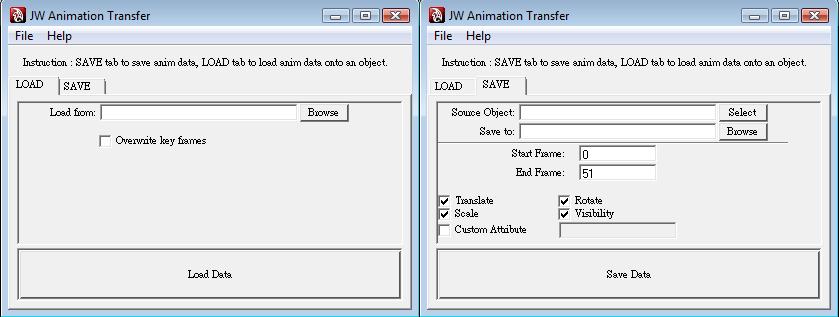
A friend of mine was asking me if it is possible to have a script that can save the animation data into a text file and load the saved animation data text file into another object. So I wrote a simple Python script that could perform such operation. It saves the keys as well as its animation curves and tangents.

The GUI is pretty simple to navigate. There are two tabs, LOAD and SAVE. To save out animation data into a text file, first select the object with the animation that you like to save out. Then click 'Browse' to browse to a directory where you want to save the text file containing the animation data. You can specify the start frame and end frame, as well as choosing the channels you like to save such as translate, rotate, scale and visibility. I made an additional custom attribute if you ever need one. The 'Save Data' button executes the saving data script. And to load the animation data, all you need to do is to choose your object, click 'Browse' to select your saved animation data text file, and decide whether if you like to remove the current keys on the selected object by ticking the checkbox. A click on 'Load Data' will executes the loading data script.

That is all.


Download link: Python File : jwAnimTransfer.py

** Note that this script is very simple. It can only save 1 object's animation at one time. Not that great, I know! Well, if you have any suggestions to make it more useful, let me know. Thanks!

Tuesday, January 4, 2011

Joint Labeling

I developed this script about a year ago. It is used to rename the joint labeling and set the 'side' of the selected joints according to their prefix. In my case, I used 'cc' for center, 'll' for left side and 'rr' for right side. You may modify that to suit your preference. It is important to make sure the name on both sides of the selected joints are the same except its prefix. The script is as below:


# Import Maya functions

import maya.cmds as cmds

# Prefixes change here

leftSide = 'll'
rightSide = 'rr'
center = 'cc'

def jointLabeling ():

    sel = []
    sel = cmds.ls (sl=True, fl=True)

    for i in sel:

        afterName=i.split ('_', 1)[0] # take the starting prefix and check
        afterNameTwo=i.split ('_', 1)[1] # take the obj's name and check

        if afterName ==
leftSide:
            cmds.setAttr ('%s.side'%i, 1)
            cmds.setAttr ('%s.type'%i, 18)
            cmds.setAttr ('%s.otherType'%i, '%s'%afterNameTwo, type= "string")
            print 'Labeled %s prefix called %s' %(afterName, afterNameTwo)

        if afterName == rightSide:
            cmds.setAttr ('%s.side'%i, 2)
            cmds.setAttr ('%s.type'%i, 18)
            cmds.setAttr ('%s.otherType'%i, '%s'%afterNameTwo, type= "string")
            print 'Labeled %s prefix called %s' %(afterName, afterNameTwo)

        if afterName == center:
            cmds.setAttr ('%s.side'%i, 0)
            cmds.setAttr ('%s.type'%i, 18)
            cmds.setAttr ('%s.otherType'%i, '%s'%afterNameTwo, type= "string")
            print 'Labeled %s prefix called %s' %(afterName, afterNameTwo)


Monday, February 22, 2010

Returning multiple values from a Python function

I was working on my Python scripts. Then I came to a point where I require more than 1 value to be returned from a function that I wrote. Usually, functions in Python can only return one thing, but the one thing can be a collection of items - tuple. The returned values can be broken down into a bunch of variables:

# Create a function as below, with three returns:
def addme(num):
v1 = num + 15
v2 = num - 10
v3 = num * 2
return v1,v2,v3;

# Running the function:

main = addme (15)
sA, sB, sC = addme (15)

#By printing main, main will be equal to (30,5,30):

 
print main
 

#By printing main[0], main[1] and main[2], you'll get individual values of 30, 5 and 30 respectively:
 print main[0]
print main[1]
print main[2]

#Or, another way would be printing sA, sB and sC; you'll get 30, 5 and 30 respectively as well:

 
print sA
print sB
print sC


Thursday, February 18, 2010

'It has non-zero rotations'

UPDATE:
Awhile ago I haven't update this. So the previous method was outdated for some time.
A big thanks to Jakub Krompolc who has suggested a more effective solution which I should have rectify to this post earlier. 

cmds.makeIdentity( 'jointName', a=1, r=1 )

"This will convert all rotations to joint orients. Unless your joint hierarchy contains non-resettable objects, like some shapes etc. That`s the only limitation."

Friday, February 12, 2010

Modeling bumpy polygon plane

This simply Python script creates bumpy surface on a polygon plane by altering the Y position of each vertex points in a random manner. The User Presets area can be edited according to your needs.

import maya.cmds as cmds
import random

#User Presets Below This Line-----------------
numberOfVertex = 10200 # Number of vertexes
pName = 'pPlane1' # Name of polygon plane
loR = -5 # Lowest point of bumping
hiR = 5 # Highest point of bumping
mult = 0.1 # Magnitude of randomness
#User Presets Above This Line-----------------

for i in range(1,numberOfVertex):
    vtx = ('%s.vtx[%s]'%(pName,i))
    cmds.move(0,(random.randrange(loR,hiR)*mult),0,vtx,r=True,ws=True)


Note that if your polygon plane is very high in resolution, it might take longer to complete depending on the processing power of your machine. I tried 10000+ vertexes and it took my computer's Maya about 30 seconds to complete.

Don't panic if Maya froze during the process!